Steel Beam Sizes & Section Properties

Search, filter and compare standard steel sections from US AISC, Canadian CISC, British, European and Australian libraries. View dimensions and section properties, download size charts, or analyze any section in the Kannamwar Engineering Calculator.

Search SectionsCompare SectionsOpen in Beam CalculatorExport Excel or PDFOpen 2D Structural Analysis

Steel Section Finder

Search or browse standard steel sections.

Showing US AISC · W-Shapes · Imperial

AISC Shapes Database v16.0 · 2,299 sections

Searches every available library and shape family. Leave the field empty to browse the filters below.

Found 289 AISC W-shapes. Select a row to preview or check sections to compare.

Showing 76-150 of 289.

AISC W-shape dimensions and section properties in imperial units
CompareDesignationWeight (lb/ft)Depth, d (in)Flange width, bf (in)tw (in)tf (in)Area (in²)Ix (in⁴)Sx (in³)Zx (in³)Row action
W30x32632632.415.41.142.0595.916,8001,0401,190Open calculator
W30x2922923215.31.021.858614,9009301,060
W30x26126131.615.20.931.657713,100829943
W30x23523531.315.10.831.569.311,700748847
W30x21121130.915.10.7751.3262.310,300665751
W30x14814830.710.50.651.1843.66,680436500
W30x19119130.7150.711.1956.19,200600675
W30x17317330.4150.6551.0750.98,230541607
W27x36836830.414.71.382.4810916,2001,0601,240
W30x13213230.310.50.615138.85,770380437
W30x12412430.210.50.5850.9336.55,360355408
W30x1161163010.50.5650.8534.24,930329378
W27x3363363014.61.262.2899.214,6009721,130
W30x10810829.810.50.5450.7631.74,470299346
W30x999929.710.50.520.67293,990269312
W27x30730729.614.41.162.0990.213,1008871,030
W30x909029.510.40.470.6126.33,610245283
W27x28128129.314.41.061.9383.111,900814936
W27x2582582914.30.981.7776.110,800745852
W27x23523528.714.20.911.6169.49,700677772
W27x21721728.414.10.831.563.98,910627711
W27x19419428.1140.751.3457.17,860559631
W24x3703702813.71.522.7210913,4009571,130
W27x17817827.814.10.7251.1952.57,020505570
W27x12912927.6100.611.137.84,760345395
W27x16116127.6140.661.0847.66,310458515
W24x33533527.513.51.382.4898.311,9008641,020
W27x14614627.4140.6050.97543.25,660414464
W27x11411427.310.10.570.9333.64,080299343
W27x10210227.1100.5150.83303,620267305
W24x30630627.113.41.262.2889.710,700789922
W27x949426.9100.490.74527.63,270243278
W27x848426.7100.460.6424.72,850213244
W24x27927926.713.31.162.0981.99,600718835
W24x25025026.313.21.041.8973.58,490644744
W24x2292292613.10.961.7367.27,650588675
W24x20720725.7130.871.5760.76,820531606
W24x19219225.5130.811.4656.56,260491559
W24x17617625.212.90.751.3451.75,680450511
W24x16216225130.7051.2247.85,170414468
W24x14614624.712.90.651.09434,580371418
W24x10310324.590.550.9830.33,000245280
W24x13113124.512.90.6050.9638.64,020329370
W24x949424.39.070.5150.87527.72,700222254
W24x11711724.312.80.550.8534.43,540291327
W24x848424.19.020.470.7724.72,370196224
W24x10410424.112.80.50.7530.73,100258289
W21x27527524.112.91.222.1981.87,690638749
W24x767623.98.990.440.6822.42,100176200
W24x626223.77.040.430.5918.21,550131153
W24x686823.78.970.4150.58520.11,830154177
W21x24824823.712.81.11.9973.86,830576671
W24x555523.67.010.3950.50516.21,350114134
W14x87387323.618.83.945.5125718,1001,5302,030
W21x22322323.412.711.7966.56,080520601
W21x2012012312.60.911.6359.35,310461530
W14x80880822.818.63.745.1223815,9001,3901,830
W21x18218222.712.50.831.4853.64,730417476
W21x16616622.512.40.751.3648.84,280380432
W14x73073022.417.93.074.9121514,3001,2801,660
W18x31131122.3121.522.7491.66,970624754
W21x14714722.112.50.721.1543.23,630329373
W18x28328321.911.91.42.583.36,170565676
W21x13213221.812.40.651.0438.83,220295333
W21x12212221.712.40.60.9635.92,960273307
W21x939321.68.420.580.9327.32,070192221
W14x66566521.617.72.834.5219612,4001,1501,480
W21x11111121.512.30.550.87532.62,670249279
W18x25825821.511.81.282.3765,510514611
W21x838321.48.360.5150.83524.41,830171196
W21x10110121.412.30.50.829.82,420227253
W21x737321.28.30.4550.7421.51,600151172
W21x575721.16.560.4050.6516.71,170111129
W21x686821.18.270.430.685201,480140160
W18x23423421.111.71.162.1168.64,900466549
PreviousPage 2 of 4Next

Steel Beam Size Charts by Region and Standard

Browse all 6,691 integrated steel sections by country, regional standard and section family. Every family link opens its complete size chart with searchable dimensions, weights and section properties.

How to Use the Steel Section Finder

  1. Search or browse

    Enter a complete designation such as W12×26, W310×39 or IPE 300, or select a regional library, shape family and depth series.

  2. Filter by dimensions and properties

    Use advanced filters to narrow sections by maximum depth, maximum weight, minimum Ix and minimum Sx.

  3. Preview and compare

    Select a row to see its labelled cross-section. Check multiple sections to compare their dimensions and properties side by side.

  4. Open it in the Beam Calculator

    Choose “Analyze in Beam Calculator” to open a new beam model with the selected section properties already loaded for slope, deflection and stress analysis.

Understanding Steel Beam Designations

Steel section labels encode family, size and weight differently by region. Use the examples below to read common US, Canadian, British and European designations.

What does W12×26 mean?

W12×26 is an American wide-flange steel section. “W” identifies the shape family, “12” is the approximate nominal depth in inches, and “26” is the nominal weight in pounds per foot. The actual depth can differ from the nominal designation, so the tabulated dimensions should be used for analysis and detailing.

What does W310×39 mean?

In the Canadian metric designation W310×39, “310” represents the approximate nominal depth in millimetres and “39” represents the nominal mass in kilograms per metre.

What does UB 406×178×67 mean?

A British universal beam such as UB 406×178×67 is read as approximate depth × flange width × mass per metre: about 406 mm deep, 178 mm flange width, and 67 kg/m.

What does IPE 300 mean?

IPE 300 belongs to the European IPE family. “300” is the nominal section depth in millimetres. Actual depth, flange width and thickness vary by product and should be taken from the selected steel library.

Steel Beam Dimensions and Section Properties Explained

These symbols appear in the steel section finder and PDF charts. Use the table below to understand what each property represents and why it matters in beam and column design.

SymbolPropertyWhat it representsCommon unitsWhy it matters
dOverall depthDistance between the outer flange facesin, mmInfluences stiffness, clearance and bending behaviour
bfFlange widthOverall width of the flangein, mmAffects lateral stability and y-axis behaviour
twWeb thicknessThickness of the vertical webin, mmImportant for shear resistance
tfFlange thicknessThickness of the flangein, mmImportant for flexural resistance and local slenderness
ACross-sectional areaTotal steel areain2, mm2Used for weight, axial stress and average shear stress
IxMoment of inertia about the x-axisDistribution of area about the x-axisin4, mm4Controls flexural stiffness and deflection about the x-axis
IyMoment of inertia about the y-axisDistribution of area about the y-axisin4, mm4Controls stiffness about the y-axis
SxElastic section modulusIx divided by the extreme-fibre distancein3, mm3Used for elastic bending stress
SyElastic section modulus about the y-axisElastic modulus about the y-axisin3, mm3Used for bending stress about the y-axis
ZxPlastic section modulusPlastic bending property about the x-axisin3, mm3Used in plastic flexural resistance calculations
ZyPlastic section modulus about the y-axisPlastic property about the y-axisin3, mm3Used in plastic resistance about the y-axis
rxRadius of gyration about the x-axis√(Ix/A)in, mmUsed in member slenderness calculations
ryRadius of gyration about the y-axis√(Iy/A)in, mmOften important for column and lateral stability
JTorsional constantSaint-Venant torsional propertyin4, mm4Used in torsional and stability calculations
CwWarping constantResistance associated with nonuniform warpingin6, mm6Used in lateral-torsional buckling analysis

Types of Structural Steel Sections

Steel libraries use different designations for similar families. Use the crosswalk below to open the matching catalog for each region.

Pipe

Round sections designated according to nominal pipe sizing conventions.

How to Compare and Select a Steel Beam Size

A section with a larger moment of inertia is generally stiffer about the corresponding axis, but that does not automatically make it suitable for a particular beam. The required section depends on the span, support conditions, applied loads, material grade, unbraced length, deflection criteria and applicable design standard.

Practical selection workflow

  1. Establish span and support conditions.

  2. Define dead, live and other applicable loads.

  3. Select the appropriate material and regional standard.

  4. Identify candidate sections based on depth, weight and stiffness.

  5. Analyze reactions, shear, moment, slope and deflection.

  6. Complete the applicable strength, stability and serviceability checks.

  7. Compare passing alternatives for weight and constructability.

Analysis workflows

Use Steel Sections in Beam and 2D Structural Analysis

For a line beam, select a section and choose “Analyze in Beam Calculator” to open a model with its properties already loaded. For portal frames, trusses, braced frames and other connected systems, open the 2D Structural Analysis app and assign standard or custom sections to each member.

Need to combine catalogue shapes with plates, openings or imported CAD geometry? Use the free Section Builder for custom, arbitrary and built-up cross-sections.

  • Simply supported, cantilever, fixed and continuous beams
  • Point loads, distributed loads and applied moments
  • Multiple sections along a beam
  • Slope and deflection diagrams
  • Bending and shear stress results
  • PDF calculation reports
  • Saved models
  • AI-assisted beam model generation
Calculation ReportPDF
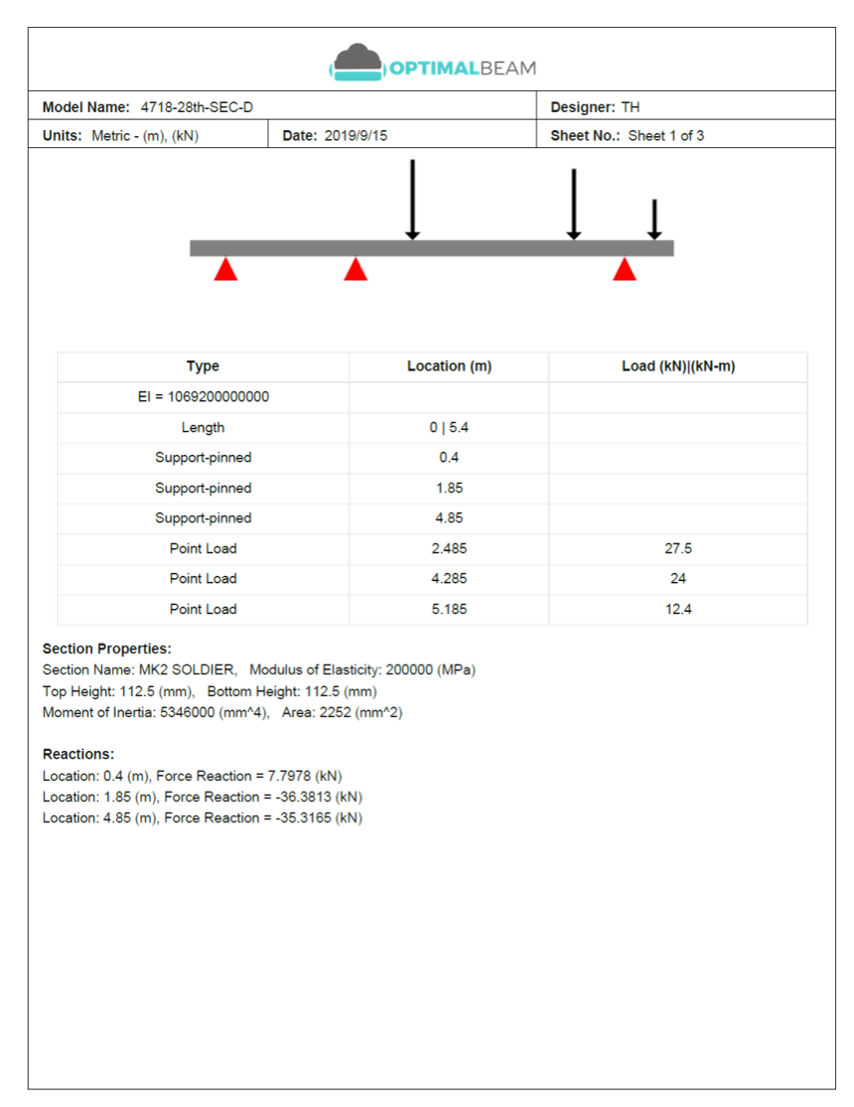
Beam calculation PDF report page showing the beam model, loads, supports, section properties, and reactions
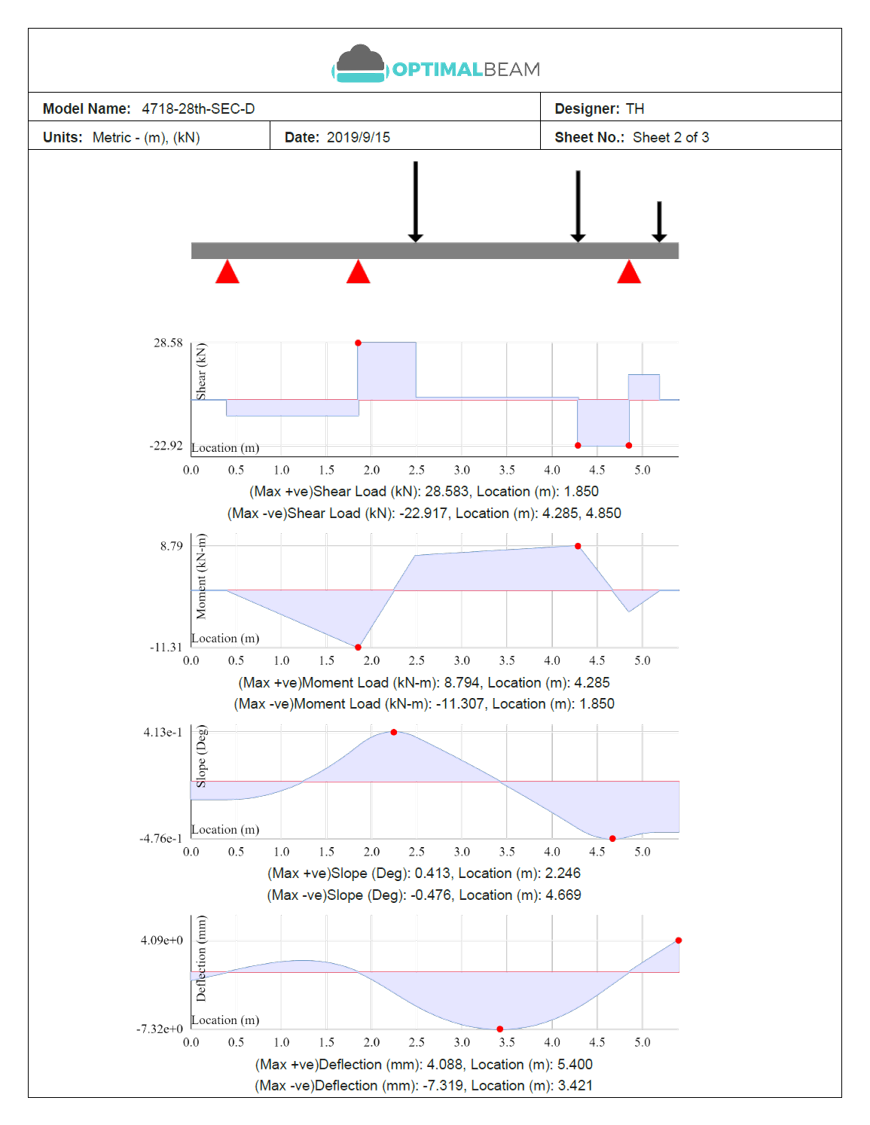
Beam calculation PDF report page showing shear, moment, slope, and deflection diagrams

PDF downloads

Download section sheets and size charts for calculation packages

Get printable Kannamwar Engineering PDFs instantly from the finder—no email wait. Use a section sheet for one designation, or a size chart for the family or group you are browsing.

  • Section sheet with dimensional schematic
  • Geometry and section properties tables
  • Family or group size charts from the toolbar
  • Imperial or metric units from your current view
Get a section sheet

Select a section above, then use Download PDF on the selected card.

Kannamwar EngineeringPDF

W12x26

AISC · Wide flange · Imperial

Not to scale

Geometry

PropValPropVal
Wt26d12.2

Section properties

PropValPropVal
Ix204Iy29.1

Methodology

Data sources

Kannamwar Engineering preserves the underlying published source values and uses normalized values for unit conversion and calculations. Values displayed in the table may be rounded for readability. Confirm critical dimensions and properties against the official publisher’s tables before fabrication or final design.

AISC Shapes Database v16.0

Active library
Source / publisher
AISC (American Institute of Steel Construction)
Edition / version
Shapes Database v16.0
Sections
2,299
Last verified
July 2026

CISC Structural Section Tables SST12.1

Source / publisher
CISC (Canadian Institute of Steel Construction)
Edition / version
Structural Section Tables v12.1
Sections
1,514
Last verified
July 2026

Eurocode 3 UK National Annex and ArcelorMittal Sections 2026-1

Source / publisher
CEN / European steel sections
Edition / version
European Steel Sections v2026.1
Sections
1,239
Last verified
July 2026

British-Sections-1 and Eurocode 3 UK shared angle/hollow tables

Source / publisher
UK / British steel sections
Edition / version
Steel Sections v2023.11
Sections
1,196
Last verified
July 2026

Australian-Sections.xlsx (Sheets 1-19)

Source / publisher
Australian steel sections
Edition / version
Australian Steel Sections v2019.11
Sections
443
Last verified
July 2026

Last verified: July 2026

Report a suspected data issue

Questions & answers

Frequently Asked Questions

What do the numbers in a steel beam designation mean?

The numbers encode size differently by library. In AISC W12×26, 12 is the approximate nominal depth in inches and 26 is the weight in pounds per foot. In Canadian W310×39, 310 is the approximate depth in millimetres and 39 is the mass in kilograms per metre. British UB designations use depth × flange width × mass, while IPE 300 uses a nominal depth in millimetres. Always use the tabulated dimensions for detailing and analysis.

What is the difference between an I-beam and a W-beam?

“I-beam” is an informal name for I-shaped sections. A W-beam is an AISC wide-flange shape—the common rolled I-section with parallel flanges. American standard S shapes are also I-shaped but use different flange geometry. Other libraries use designations such as UB, UC or IPE for similar families.

What is the difference between nominal depth and actual depth?

Nominal depth is the rounded depth used in the designation, such as the “12” in W12×26. Actual depth is the published overall depth from the steel table and can differ from the nominal value. Use the tabulated depth for clearance, connections and analysis.

What is the difference between Ix, Sx and Zx?

Ix is the moment of inertia about the x-axis and governs stiffness and deflection. Sx is the elastic section modulus about the x-axis and is used in elastic bending stress checks. Zx is the plastic section modulus about the x-axis and is used for plastic bending strength of suitable ductile sections. None of these alone is a complete code design check.

How do I compare two steel beam sizes?

Select multiple sections with the compare checkboxes to review depth, weight, Ix, Sx and related properties side by side. For project suitability, send candidates to the Kannamwar Engineering calculator and compare them under the same span, supports and loads.

Can I switch between imperial and metric units?

Yes. Use the Metric / Imperial toggle in the steel section finder. Display values are normalized for the selected unit system while the original source data remains stored in the database.

Which steel section libraries are included?

The finder includes 6,691 sections from AISC Shapes Database v16.0, Canadian CISC Structural Section Tables SST12.1, and the integrated European, British and Australian libraries across rolled, welded, angle, tee, channel, pipe and hollow-section families.

Can I download the steel beam size chart?

Yes. Use Export Excel or Export PDF in the finder toolbar. Both exports include the sections that match your current family, unit system and active filters. For a single designation, select the section and use Download PDF on the selected card.

Can I analyze a selected section in the beam calculator?

Yes. Choose Analyze on a selected section to open the Kannamwar Engineering calculator with that section’s geometric and section properties loaded into a new beam model. Then define the span, supports and loads to calculate reactions, shear, moment, slope, deflection and stress.

Does a higher Ix mean a beam can carry more load?

No. A higher Ix means the section is generally stiffer about that axis, which often reduces deflection, but it does not by itself determine load capacity. Capacity depends on span, support conditions, loads, material grade, unbraced length, deflection limits and the applicable design standard.

Does this tool determine the correct beam size for my project?

No. This page helps you browse, compare and analyze steel sections. Selecting the correct beam for a project requires engineering judgment and the applicable strength, stability and serviceability checks for your design standard.

Are the section dimensions suitable for fabrication or final design?

Use these values as a convenient reference from published steel shape libraries. Before fabrication or final design, confirm critical dimensions and properties against the publisher’s official tables for the edition you are using.

↑↓ to move · ↵ to open · esc to close⌘K